DPDoc
DP Doc
This is the homepage for my thesis, which is about the IMGUI paradigm. The thesis includes a review of the IMGUI paradigm and a sample application implemented in 3 different frameworks.
The sample application is a diagram editor that generates a corresponding diagram based on a text description provided in a specific format (the diagram language).
Links
-
The diagram editor implemented in Dear ImGui is available at https://github.com/RadekMocek/DiagramPche_DearImGui
-
The diagram editor implemented in egui is available at https://github.com/RadekMocek/DiagramPche_egui
-
The diagram editor implemented in Qt is available at https://github.com/RadekMocek/DiagramPche_Qt
-
A repository containing the thesis text and initial research projects is available at https://github.com/RadekMocek/DP
The diagram language
- Table of contents:
Getting started
Diagram consists of nodes and paths. We’ll start by creating a simple diagram with two nodes and one path connecting them:
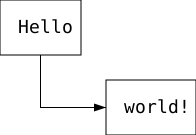
First, we define the nodes with unique IDs and set their text with value and position with xy:
[node.node1]      # Node with ID "node1"
value = "Hello"   # Value of node's text label will be "Hello"
xy = [50, 50]     # This is the position, where node's pivot will be placed.
                  # Default pivot is its top-left corner, but this can be changed with the `pivot` parameter.
[node.node2]      # Node with ID "node2"
value = "world!"
xy = [155, 129]
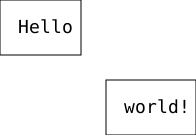
The position of the second node seems pretty random. Also, if you move the first node, the second one doesn’t follow. Let’s change that by making the second node’s position relative to the first one:
# Definition of the first node is the same

[node.node2]
value = "world!"
xy = ["node1", "bottom-right", 25, 25]  # [parent ID, parent pivot, x, y]
Now, the top-left corner of the second node is located at [25, 25] from the bottom-right corner of the first node (parent node). You can try to move the parent node and see how the second one follows. You can also try to change the pivot parameters of the nodes or pivot value in the xy array and see what happens.
Now for the path. Paths must have a start point and an end point. Their position is defined in the same way as position of the node, so it can be defined relatively:
# Definition of the nodes is the same

[[path]]
start = ["node1", "bottom", 0, 0]
end = ["node2", "left", 0, 0]
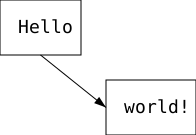
You can define any number of pathpoints, that lie between the start and end points. Parameters points is used for that. This is our final diagram description:
[node.node1]
value = "Hello"
xy = [50, 50]

[node.node2]
value = "world!"
xy = ["node1", "bottom-right", 25, 25]

[[path]]
start = ["node1", "bottom", 0, 0]
end = ["node2", "left", 0, 0]
points = [
    ["", "start", 0, "", "end", 0]  # Pathpoint x is the same as start point x
]                                   # Pathpoint y is the same as end point y
See the reference below for all the possibilities. For more practical examples, open the app and go to Help → Examples. The app implemented in Qt also contains images used in the thesis.
Reference
The diagram language is a TOML v1.0.0 “schema”. It uses tables, arrays, strings, and integers. Since no floats are used, integers will be referred to as numbers in this documentation.
Common data types
Color (data type)
- In diagrams, you can change the color of:
- Node fill
- Node border
- Path stroke
- Background of path label
The color is set by specifying the RGBA8888 color components. These can be specified either using a hex string or a four-number array.
For example, a semi-transparent red color can be achieved in several ways:
# [Option 1: RGBA HEX string in "#RRGGBBAA" format]
# Must be a string of 9 characters, 1st character is always '#', followed by 4 hexadecimal numbers:
color = "#FF000080"
# The string is not case sensitive, so these are also valid:
color = "#ff000080"
color = "#fF000080"
color = "#Ff000080"

# [Option 2: Four-number array]
# The numbers range from 0 to 255 (inclusive):
color = [255, 0, 0, 128]
Pivot (data type)
A pivot is used to point to a specific location on a node. For a rectangular node, these are its center, the midpoints of its sides, and its corners. These points can then serve as “reference points” for setting relative coordinates.
- Pivot value can be used to set:
- Node exact placement: Which point on the node will correspond to the coordinates we have set for the node?
- Node label placement
- Pivot value must be used when setting:
- Relative position of another node
- Relative position of any point on some path
- Pivot value is specified as a string, these are the valid values:
"top-left""top""top-right""right""bottom-right""bottom""bottom-left""left""center"
Node
Node is the main building block of every diagram. In its default form, it is a rectangle containing a text label:

Every node has to have a unique string ID. In the TOML schema a table called node is expected, which contains key-value pairs, where key is the ID and value is a table representing node with that ID. So nodes should be denoted like this:
# This is a node with ID "node1"
[node.node1]

# You can also put ID in single or double quotes
[node.'node2']
[node."node3"]

# Now you can't do this, because ID "node1" was already taken in this document
[node.node1]
color (Node)
Expected data type: Color
Default value: [255, 255, 255, 255] (white)
Description: Color of node fill.
Example:
[node.node1]
color = "#c6daf2cf"

# Alternatively:
color = [198, 218, 242, 207]

color_border
Expected data type: Color
Default value: [0, 0, 0, 255] (black)
Description: Color of node border.
Example:
[node.node1]
color_border = "#FF8C00FF"

# Alternatively:
color_border = [255, 140, 0, 255]

label_pos
Expected data type: Pivot
Default value: "center"
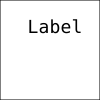
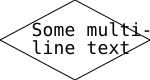
Description: Sets the position of the label within its node. This option only makes a difference if the node has a custom size. A padding is applied, for more precise label placement, this can be combined with label_shift.
Example:
[node.node1]
size = [100, 100]
value = "Label"
label_pos = "top"
label_shift
Expected data type: Array of two numbers
Default value: [0, 0]
Description: Moves node label along the x and y axes.
Example:
[node.node1]
type = "diamond" # Label shift is useful when working with diamond nodes
value = "Some multi-\nline text"
size = [150, 80]
label_shift = [6, 0]
pivot
Expected data type: Pivot
Default value: "top-left"
Description: Each node is located at some coordinates. This option determines exactly which point on the node corresponds to those coordinates.
Example:
[node.node1]
xy = [100, 100]
pivot = "center" # Try commenting out this line to see the difference
size
Expected data type: Array of two numbers
Default value: [0, 0]
Description: Sets custom width and height for the node. If set to 0, the node size (in the given dimension) corresponds to the label size plus padding.
Example:
[node.node1]
size = [200, 0] # => custom width, default height

type
Expected data type: One of these strings: "rectangle", "ellipse", "diamond", "text"
Default value: "rectangle"
Description: Shape of the node.
Example:
[node.node1]
type = "ellipse"

value
Expected data type: String
Default value is equal to the node ID.
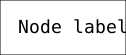
Description: Node label value. Empty string "" can be used for no text. Newline characters \n can be used for multiline text.
Example:
[node.node1]
value = "Node label"
xy
Expected data type: Either two-item array [number, number] or four-item array [string, string, number, number]
Default value: [0, 0]
Description: Position of the node.
Two-item array variant sets the position absolutely on the x and y axes.
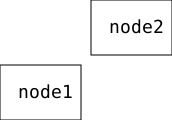
Four-item array variant sets the position relatively to some other node in the diagram, which is called the “parent node”. First item is the parent node ID. Second item is parent node pivot, to which the currently defined node position is relative to. Third and fourth items set the position on the x and y axes. Position can be thought of as a shift from parent node pivot.
Example:
[node.node1]
xy = [0, 100]

[node.node2]
pivot = "bottom-left"
xy = ["node1", "top-right", 10, -10]
z (Node)
Expected data type: Number from 0 to 9 (inclusive)
Default value: 4
Description: Moves the node along the z-axis. Nodes with bigger z value will be drawn in front of the nodes with smaller z value. Draw order of overlapping nodes with the same z value is not guaranteed.
Example:
[node.node1]
color = [255, 120, 120, 200]
z = 1

[node.node2]
color = [120, 255, 120, 200]
xy = [10, 10]
z = 2

Path
Paths are usually used to visualise connections between nodes, but they can start and end anywhere. Paths consist of points. Every path has exactly one start point and one or more end points. There can be any amount of pathpoints between the start and the end point. Path can also have text label and can start or end with arrow tips:

Paths do not need to have any IDs. In the TOML schema, an array of tables called path is expected. Each item represents one path, so paths should be denoted like this:
# This diagram has two paths

[[path]]
# Here you can write key-value pairs for the first path

[[path]]
# Here you can write key-value pairs for the second path
All of the examples start with this definition of nodes, which is not mentioned in the examples themselves:
[node.nodeA]

[node.nodeB]
xy = ["nodeA", "top-right", 150, 0]

[node.nodeC]
pivot = "top"
xy = ["nodeB", "bottom", 0, 150]
color (Path)
Expected data type: Color
Default value: [0, 0, 0, 255] (black)
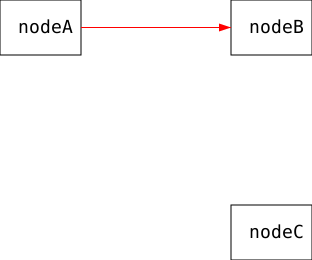
Description: Color of the path stroke.
Example:
[[path]]
start = ["nodeA", "right", 0, 0]
end = ["nodeB", "left", 0, 0]
color = "#ff0000ff"

# Alternatively:
color = [255, 0, 0, 255]
end
Expected data type: Either two-item array [number, number] or four-item array [string, string, number, number]
Default value: None (no default value is used if this is unset)
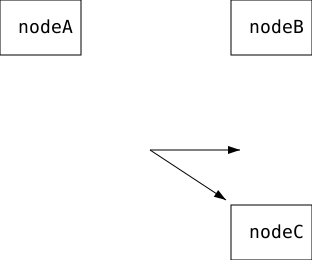
Description: Sets position of the path end point in a same way as node xy.
Example:
[[path]]
start = [150, 150]
end = [240, 150]

[[path]]
start = [150, 150]
end = ["nodeC", "top-left", -5, -5]
ends
Expected data type: Array of arrays, the inner arrays can be either two-item [number, number] or four-item [string, string, number, number] (this can be combined)
Default value: []
Description: Paths can have multiple ends, so you can basically define multiple paths with one [[path]]. Each item in the array corresponds to one end point. This is powerful when combined with pathpoints, because they can refer the end point.
Example:
[[path]]
start = [150, 150]
ends = [
    [240, 150],
    ["nodeC", "top-left", -5, -5],
]
label
Expected data type: Four-item array [string, number, number, number]
Default value: ["", 0, 0, 0] (no label)
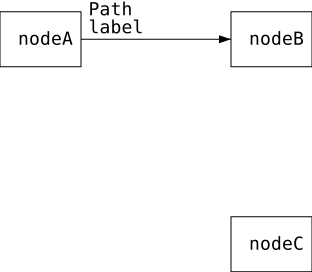
Description: Sets label for the path. Position of the label is relative to some point on the path, let’s call it “parent point”. The items in the array are:
- Text of the label
- Index of the parent point, indexed from zero
- Shift of the label in the direction to the next point on the path
- Shift of the label in a perpendicular direction
Example:
[[path]]
start = ["nodeA", "right", 0, 0]
end = ["nodeB", "left", 0, 0]
label = ["Path\nlabel", 0, 30, -20]
label_bg
Expected data type: Color
Default value: [0, 0, 0, 0] (transparent)
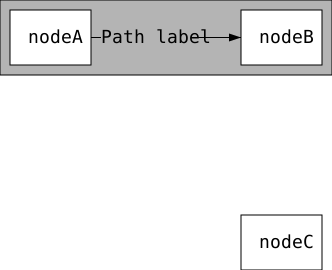
Description: Color of the path label background
Example:
[node.background]
value = ""
xy = ["nodeA", "top-left", -10, -10]
color = [180, 180, 180, 255]
z = 3
size = [332, 75]

[[path]]
start = ["nodeA", "right", 0, 0]
end = ["nodeB", "left", 0, 0]
label = ["Path label", 0, 55, 0]
label_bg = [180, 180, 180, 255]
points
Expected data type: Array of six-item arrays [string, string, number, string, string, number]
Default value: []
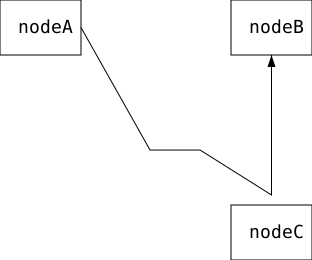
Description: Each item in the array corresponds to one pathpoint. Pathpoint is always defined as six-item array so the parsing is easier (sometimes not all of the six items are used, sorry ☺). First three items (triplet) sets the position on x axis and the second triplet sets the position on the y axis. Pathpoint position can be set in three ways: Absolute, Relative to node pivot, Relative to point. Pathpoint can be relative to the start point, end point, or previous pathpoint only on the same path.
These are the expected triplet values for each way of setting the pathpoint position:
| string | string | number | |
|---|---|---|---|
| Absolute | "" (empty string) |
"" (empty string) |
Shift from origin |
| Relative to node pivot | Node ID | Node pivot | Shift from node pivot |
| Relative to point | "" (empty string) |
"start" or "end" or "prev" |
Shift from point |
Example:
[[path]]
start = ["nodeA", "right", 0, 0]              # 1
end = ["nodeB", "bottom", 0, 0]               # 5
points = [
    ["", "", 150, "", "", 150],               # 2
    ["", "prev", 50, "", "prev", 0],          # 3
    ["nodeC", "top", 0, "nodeC", "top", -10]  # 4
]
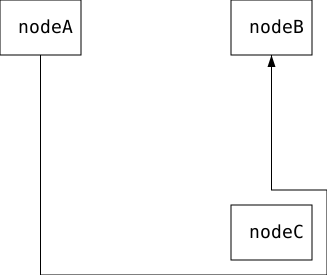
Note that the ways of defining pathpoint position don’t have be the same on the x and y axis:
[[path]]
start = ["nodeA", "bottom", 0, 0]                # 1
end = ["nodeB", "bottom", 0, 0]                  # 6
points = [
    ["", "start", 0, "nodeC", "bottom", 15],     # 2
    ["nodeC", "right", 15, "", "prev", 0],       # 3
    ["", "prev", 0, "nodeC", "top-right", -15],  # 4
    ["", "end", 0, "", "prev", 0]                # 5
]
shift
Expected data type: Either number or array of two numbers
Default value: [0, 0]
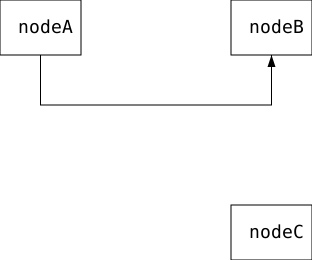
Description: This makes sense when start/end points are set relatively to some node. This creates an offset (shift) of the start/end point from the referred node pivot in a direction away from the node. The shifted point is connected to the original position. First item in array sets the shift for the start point and second for the end point, also shift = 𝑥 is a shorthand for shift = [𝑥, 𝑥]. It usually makes sense to set this as a positive number, but negative numbers can also be used.
Example:
[[path]]
start = ["nodeA", "bottom", 0, 0]
end = ["nodeB", "bottom", 0, 0]
shift = 50 # Equivalent to [50, 50]
start
Expected data type: Either two-item array [number, number] or four-item array [string, string, number, number]
Default value: [0, 0]
Description: Sets position of the path start point in a same way as node xy.
tips
Expected data type: One of these strings: "--", "<-", "->", "<>"
Default value: "->"
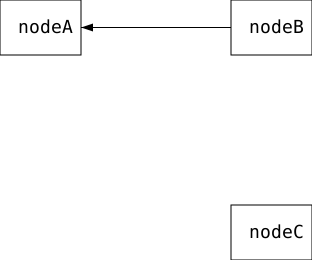
Description: Sets whether there is an arrow tip at the start and/or end of the path.
| value | arrow tip on start | arrow tip on end |
|---|---|---|
"--" |
No | No |
"<-" |
Yes | No |
"->" |
No | Yes |
"<>" |
Yes | Yes |
Example:
[[path]]
start = ["nodeA", "right", 0, 0]
end = ["nodeB", "left", 0, 0]
tips = "<-"
z (Path)
Expected data type: Number from 0 to 9 (inclusive)
Default value: 5
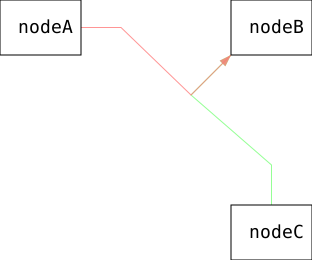
Description: Moves the path along the z-axis. Paths with bigger z value will be drawn in front of the nodes and paths with smaller z value. Draw order of overlapping paths with the same z value is not guaranteed, but it is guaranteed that paths will be in front of the nodes with same z value.
Example:
[[path]]
start = ["nodeA", "right", 0, 0]
end = ["nodeB", "bottom-left", 0, 0]
shift = 40
color = [255, 120, 120, 200]
z = 2

[[path]]
start = ["nodeC", "top", 0, 0]
end = ["nodeB", "bottom-left", 0, 0]
shift = 40
color = [120, 255, 120, 200]
z = 1
[node."z=3"]
z = 3
xy = [100, 100]

[node."z=4"]
z = 4
xy = [200, 100]

[node."z=5"]
z = 5
xy = [300, 100]

[[path]]
start = ["z=3", "left", -50, 10]
end = ["z=5", "right", 50, 10]
z = 4
label = ["z=4", 1, -20, 0]

Variables
Some number values in the diagram language can be replaced with variables. These are set as key-value pairs in TOML table called variables. Variable names as strings are then used in allowed places:
[variables]
node_x = 50
node_y = 100

[node.node1]
xy = ["node_x", "node_y"]
Variables can be used to set:
Radek Mocek, 2026